Search This Blog

Showing posts with label Windows Registry. Show all posts

Sunday, December 18, 2016

Reset Visual Studio "Look at these file types" value

private static void Main(string[] args)
{
    RegistryKey regKey = null;

    try
    {
        //HKEY_CURRENT_USER\SOFTWARE\Microsoft\VisualStudio\14.0\Find
        regKey = Registry.CurrentUser.OpenSubKey(@"SOFTWARE\Microsoft\VisualStudio\14.0\Find", true);

        var filters = regKey.GetValueNames().Where(v => v.StartsWith("Filter"));
        foreach (var filter in filters)
        {
            regKey.SetValue(filter, string.Empty);
        }
    }
    catch (Exception ex)
    {
        Console.WriteLine("Registry clear for filter keys failed. {0}", ex.Message);
        return;
    }
}

Tuesday, December 6, 2016

Reading Windows Registry values in c#

An example I wrote for retrieving any windows registry value, and return its string representation (some values are stored as byte arrays, some as 4-byte or 8-byte numbers, etc)


private static bool GetRegistryKeyValue(string keyFullPathWithoutRoot, string subKey, out string valueAsStr, RegistryHive rootNode = RegistryHive.LocalMachine, RegistryView registryView = RegistryView.Registry64, bool getNumericValuesInHexaNotation = true, bool displayMessageBoxUponErrors = false)
{
    //search a registry key for a given subkey, if found return its value in a textual representation

    /*
     * Note:
     * The Wow6432 registry entry indicates that you're running a 64-bit version of Windows.
     * The OS uses this key to present a separate view of HKEY_LOCAL_MACHINE\SOFTWARE for 32-bit applications that run on a 64-bit version of Windows.
     */


    RegistryKey root = RegistryKey.OpenBaseKey(rootNode, registryView);
    RegistryKey registryKey = null;
    object subKeyValue = null;
    valueAsStr = null;

    try
    {
        //read key
        registryKey = root.OpenSubKey(keyFullPathWithoutRoot);

        if (registryKey != null)
        {
            //get subKey value type (binary, dword, etc)
            RegistryValueKind subKeyValueKind = registryKey.GetValueKind(subKey);
            subKeyValue = registryKey.GetValue(subKey);
            switch (subKeyValueKind)
            {
                case RegistryValueKind.Binary:
                    byte[] byteArray = (byte[])subKeyValue;
                    valueAsStr = string.Join(" ", byteArray.Select(b => b.ToString()));
                    break;

                case RegistryValueKind.DWord:
                    int dword = (int)subKeyValue;
                    valueAsStr = getNumericValuesInHexaNotation ? Convert.ToString(dword, 16).ToUpper() : dword.ToString();
                    break;

                case RegistryValueKind.QWord:
                    long qword = (long)subKeyValue;
                    valueAsStr = getNumericValuesInHexaNotation ? Convert.ToString(qword, 16).ToUpper() : qword.ToString();
                    break;

                case RegistryValueKind.String:
                    valueAsStr = (subKeyValue ?? string.Empty).ToString();
                    break;
            }
        }
    }
    catch (Exception ex)
    {
        Console.WriteLine($"Failed to read {keyFullPathWithoutRoot}\\{subKey} key from registry. {ex.Message}");
        return false;
    }

    return true;
}
private static void TestRegistryReads()
{
    List<Tuple<string, string, RegistryView>> keys = new List<Tuple<string, string, RegistryView>>
    {
        new Tuple<string, string, RegistryView>(@"SOFTWARE\Khronos\OpenCL\Vendors", "IntelOpenCL32.dll", RegistryView.Registry32),
        new Tuple<string, string, RegistryView>(@"HARDWARE\ACPI\FACS", "00000000", RegistryView.Registry64)
    };

    foreach (var key in keys)
    {
        string value;
        if (GetRegistryKeyValue(key.Item1, key.Item2, out value, RegistryHive.LocalMachine, key.Item3, displayMessageBoxUponErrors: true))
        {
            Console.WriteLine("---------------------");
            Console.WriteLine($"Key: [{key.Item1}]  SubKey: [{key.Item2}], SubKeyValue: [{value}], Architecture: [{key.Item3.ToString()}]");
        }
    }
}

Sunday, November 27, 2016

Editing windows registry to Force WebBrowser control use the latest IE version installed in local machine

Here's the C# code I used for this task:

private void EditRegistryToFixIEWebBrowserCompatibility()
       {
           string installedIEVersion = string.Empty;
           int hostAppKeyValue = 0;
           //name of the application that hosts the WebBrowser object being invoked. If you are in debugging mode, the extension should be ".vshost.exe" instead of ".exe".
           var hostAppKeyName = Assembly.GetExecutingAssembly().GetName().Name + ".exe";

           //registry key for Feature Browser Emulation
           RegistryKey regKeyFBE = null, regKeyInstalledIEVersion = null, regKeyHostApp = null;

           try
           {
               //search for Feature Browser Emulation key in relevant windows architecture
               if (Environment.Is64BitOperatingSystem)
               {
                   regKeyFBE = Registry.LocalMachine.OpenSubKey(@"SOFTWARE\\Wow6432Node\\Microsoft\\Internet Explorer\\MAIN\\FeatureControl\\FEATURE_BROWSER_EMULATION", true);
                   regKeyInstalledIEVersion = Registry.LocalMachine.OpenSubKey(@"SOFTWARE\\Wow6432Node\\Microsoft\\Internet Explorer", true);
               }
               else
               {
                   //For 32 bit machine
                   regKeyFBE = Registry.LocalMachine.OpenSubKey(@"SOFTWARE\\Microsoft\\Internet Explorer\\Main\\FeatureControl\\FEATURE_BROWSER_EMULATION", true);
                   regKeyInstalledIEVersion = Registry.LocalMachine.OpenSubKey(@"SOFTWARE\\Microsoft\\Internet Explorer\\", true);
               }

               //get current IE installed version
               installedIEVersion = Convert.ToString(regKeyInstalledIEVersion.GetValue("svcVersion"))?.Split('.').FirstOrDefault();
               int.TryParse(installedIEVersion, out hostAppKeyValue);
               hostAppKeyValue *= 1000;
           }
           catch (Exception ex)
           {
               MessageBox.Show("Registry creation of Feature Browser Emulation key failed for Internet Explorer failed. {0}", ex.Message);
               return;
           }

           #region Search for registry key

           try
           {
               //search for a dword with a key named like our app's exe (if its value is lower than the current installed IE version, discard
               hostAppKeyValue = Math.Max(hostAppKeyValue, Convert.ToInt32(regKeyFBE.GetValue(hostAppKeyName)));
           }
           catch (Exception)
           {
               MessageBox.Show($"{hostAppKeyName} key does not exist. Creating...");
               regKeyHostApp = regKeyFBE.CreateSubKey(hostAppKeyName);
               int.TryParse(installedIEVersion, out hostAppKeyValue);
               hostAppKeyValue *= 1000;
           }

           #endregion

           // Need to set the minimum IE version currently supported by Google Maps's api - multiplied by 1000
           regKeyFBE.SetValue(hostAppKeyName, unchecked(hostAppKeyValue), RegistryValueKind.DWord);

           try
           {
               //Check for the key after adding
               hostAppKeyValue = Convert.ToInt32(regKeyFBE.GetValue(hostAppKeyName));
           }
           catch (Exception ex)
           {
               MessageBox.Show("Registry creation of Feature Browser Emulation key failed for Internet Explorer failed. {0}", ex.Message);
               return;
           }
       }

Thursday, November 24, 2016

C# WebBrowser facing errors when navigating into a page that makes use of (the new 3.25) google maps api

Problem:

I have a win forms application that makes use of a System.Forms.WebBrowser object, which in turn navigates to a given html that contains several javascript files that makes an api for drawing areas/polygons / adding text labels, among other things, on top of google maps. The problem is that google recently upgraded their api to v3.25, in which they do not support anymore IE versions lower than 10. My WebBrowser object was always emulating an IE 7 browser (not clear why, because after creating a blank winforms project and adding a single WebBrowser into it, to navigate into a page like the mentioned above - but this time hosted locally - the user agent string displayed (after adding alert(this.navigator.userAgent); into the onload event of the body html element) contained no "compatible; MSIE 7;" or alike, rather a rv.11 (referring to IE 11)).
Having the WebBrowser running an emulation of IE 7 was causing javascript errors (Google's api stopped supporting IE versions prior to 10).

Solution:

The solution that finally worked was this one.

Summary:

  1. Make sure you have IE 10 or higher installed on the machine serving the uri WebBrowser is to navigate to.
  2. Add the registry values as indicated in the link above - do not forget, when adding the DWORD, to use a key with the exact .exe file where the WebBrowser instance is invoked.
I added another post containing the C# code for fixing this issue (another post because I wanted a post that would catch a closer-to-the-exact-issue title).

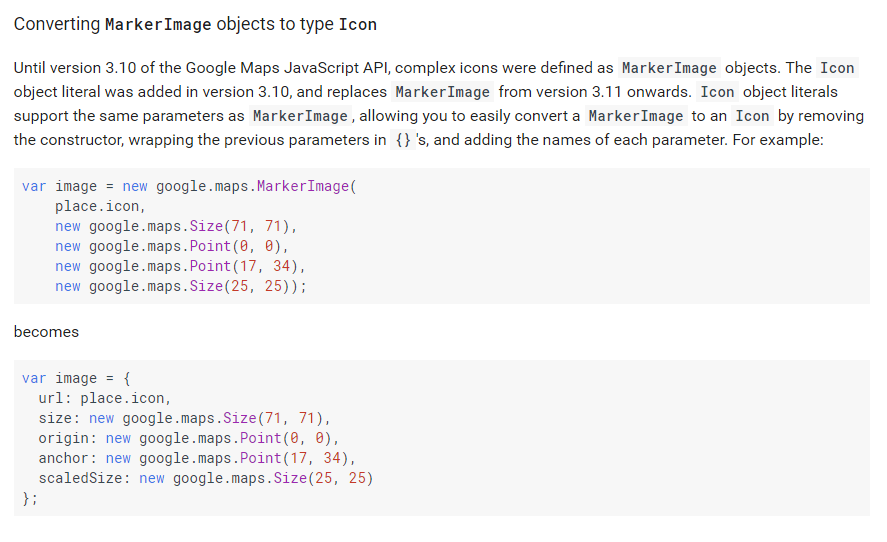
Update: The approach above was found to be incomplete, due to part of Google API being deprecated some versions from now (which was still available to 3.4). Make sure you do not make use of MarkerImage, like below.

Click here for google's reference on it, but here's the summary: